
Last updated on
Oct 31, 2026
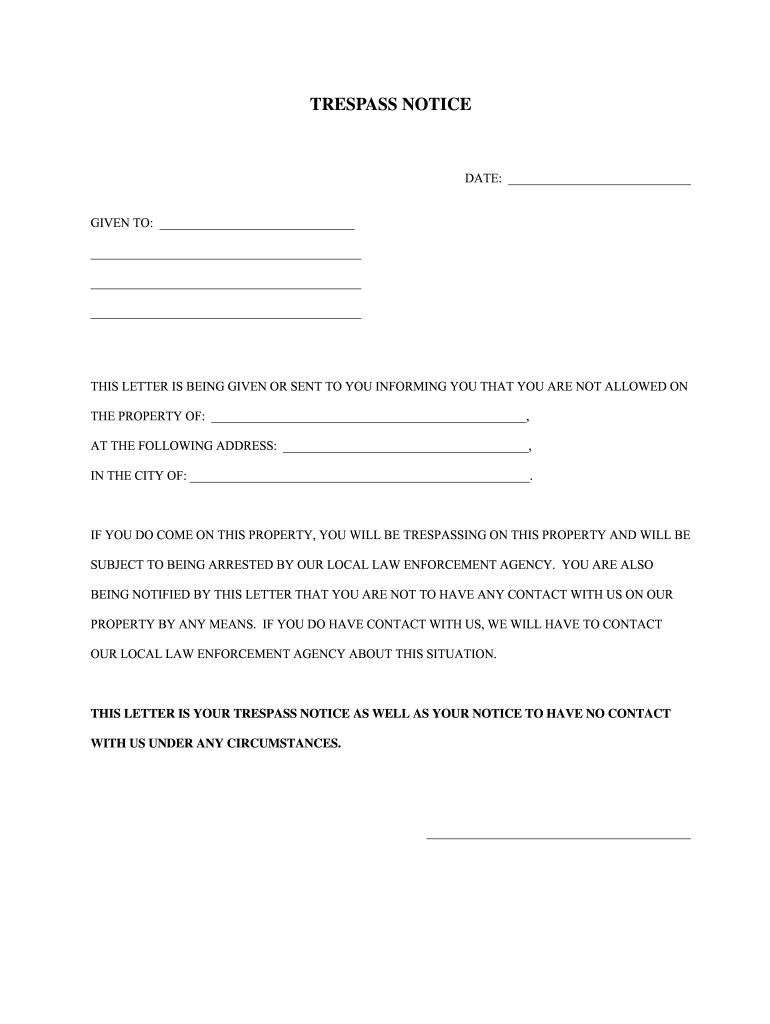
SC Trespass Notice - Spartanburg County free printable template
pdfFiller is not affiliated with any government organization

Fill out
Complete the form online in a simple drag-and-drop editor.

eSign
Add your legally binding signature or send the form for signing.

Share
Share the form via a link, letting anyone fill it out from any device.

Export
Download, print, email, or move the form to your cloud storage.
Why pdfFiller is the best tool for your documents and forms


End-to-end document management
From editing and signing to collaboration and tracking, pdfFiller has everything you need to get your documents done quickly and efficiently.
Accessible from anywhere
pdfFiller is fully cloud-based. This means you can edit, sign, and share documents from anywhere using your computer, smartphone, or tablet.
Secure and compliant
pdfFiller lets you securely manage documents following global laws like ESIGN, CCPA, and GDPR. It's also HIPAA and SOC 2 compliant.
What is SC Trespass Notice - Spartanburg County
The Trespass Notice is a legal document used by property owners to inform individuals that they are prohibited from entering their property.
pdfFiller scores top ratings on review platforms




Thank you for making documents that need to look professional so darn easy!!!
Great Service easy to use and you can find older tax forms and file them very easily. Great Service!
Who needs SC Trespass Notice - Spartanburg County?
Explore how professionals across industries use pdfFiller.

SC Trespass Notice - Spartanburg County is needed by:
-
Property owners needing to enforce boundaries
-
Businesses seeking to prevent unauthorized access
-
Landlords managing tenant disputes
-
Legal professionals drafting notice documents
-
Law enforcement officers for clarity on trespassing laws
-
Individuals seeking to protect private property
Comprehensive Guide to SC Trespass Notice - Spartanburg County
What is a Trespass Notice?
A trespass notice is a formal legal document used to inform individuals that their entry onto a specific property is unauthorized. The primary purpose of this notice is to serve as a warning to prevent individuals from trespassing on property that does not belong to them. Legally, it outlines the grounds for prohibition and what may occur should the terms be disregarded, making it essential for property owners to understand its formal requirements and implications.
Purpose and Benefits of the Trespass Notice
Issuing a trespass notice is crucial for property owners seeking to protect their rights and maintain security. The notice provides legal backing which can deter unwanted visitors from entering the property. If a recipient disregards the notice, they may face significant legal repercussions, such as fines or arrest for trespassing. This legal notice plays a key role in safeguarding one's property and ensuring personal safety.
Key Features of the Trespass Notice Template
The trespass notice template includes several key sections that ensure its effectiveness. These sections typically consist of:
-
Date of issuance
-
Recipient's name
-
Property address
-
City or locality
The template is designed to be fillable and customizable, allowing property owners to tailor the notice to their specific needs. Additionally, creating this document through pdfFiller ensures compliance with legal standards and incorporates essential security features.
Who Should Use the Trespass Notice?
This notice is predominantly useful for residential and commercial property owners who wish to prohibit unauthorized entry. It is particularly applicable in scenarios where individuals have repeatedly trespassed or posed a threat. Understanding the legal implications and available protections is vital for different property types, whether residential or commercially zoned.
How to Fill Out the Trespass Notice Online (Step-by-Step)
Completing a trespass notice online is straightforward when using pdfFiller. Follow these steps for accuracy:
-
Access the trespass notice template on pdfFiller.
-
Fill in the required fields: date, recipient's name, property address, and city.
-
Review all entered information to ensure correctness.
-
Save or submit the completed document as prompted.
Visual examples, such as a filled-out form, can also guide users through the process for better clarity.
Common Errors and How to Avoid Them
Property owners often make several mistakes when filling out the trespass notice. Common pitfalls include:
-
Incorrect or incomplete recipient information
-
Missing or inaccurate date
-
Failing to sign or date the document
To mitigate errors, double-check each field for accuracy and ensure the necessary validation steps are taken before submission.
Submission Methods and Delivery of the Trespass Notice
After completing the trespass notice, it is essential to know how to submit it effectively. This can be done through various delivery methods:
-
Emailing the notice directly to the recipient
-
Sending a physical copy via postal services
Additionally, keep records of the submission and receipt confirmation, which may be required for future legal proceedings.
What Happens After You Submit the Trespass Notice?
Once the trespass notice has been submitted, property owners should be prepared for several possible actions from the recipient. These can include:
-
Ignoring the notice and continuing to trespass
-
Contacting the property owner
-
Requesting clarification or negotiation
Property owners retain the right to enforce the notice legally, which may involve involving law enforcement if trespassing persists.
Security and Compliance When Using the Trespass Notice
When creating a trespass notice, security and compliance are paramount. pdfFiller provides:
-
256-bit encryption for data protection
-
Compliance with HIPAA and GDPR standards
It is also crucial to maintain records of all issued notices to ensure legality and accountability when addressing any future issues regarding property trespass.
Get Started with Your Trespass Notice via pdfFiller
Utilizing pdfFiller facilitates the creation of legal documents, including the trespass notice, with ease. With its user-friendly platform, you can efficiently fill out, sign, and store your document online while ensuring secure handling of sensitive information. Experience the convenience and accessibility offered by pdfFiller for all your legal documentation needs.
How to fill out the SC Trespass Notice - Spartanburg County
-
1.Access pdfFiller and search for 'Trespass Notice' in the document library.
-
2.Open the form on pdfFiller by clicking the 'Edit' button to initiate filling.
-
3.Gather necessary information including the date, recipient’s name, property address, and city details before starting.
-
4.Navigate the form interface to fill in each blank field systematically, ensuring accuracy.
-
5.Refer to the instructions provided on the form for proper wording while completing the legal notice.
-
6.Review all entered information thoroughly to ensure correctness and completeness.
-
7.Use pdfFiller’s built-in features for spell check and formatting tools when necessary.
-
8.Finalize the document by clicking the 'Save' button once all fields are completed.
-
9.You can choose to download the completed form as a PDF or submit it electronically via pdfFiller’s submission options.

What are the eligibility requirements for issuing a Trespass Notice?
Anyone owning a property has the right to issue a Trespass Notice. Ensure you have clear proof of ownership to establish authority for the notice.
How do I submit a Trespass Notice after filling it out?
You can download the completed Trespass Notice as a PDF and deliver it personally, or you may choose to send it via certified mail for a record of delivery.
What information do I need to complete the Trespass Notice?
You'll need the date, the name of the individual being warned, the property address, and instructions regarding their restriction from the property.
Can a Trespass Notice result in legal action?
Yes, if the individual continues to trespass after receiving notice, it may result in arrest or legal actions by local law enforcement.
Are there any common mistakes to avoid when filling out the Trespass Notice?
Ensure that all fields are filled out accurately, including the property address. Failing to include specific details about the prohibited actions can lead to enforcement issues.
Is notarization required for a Trespass Notice?
No, a Trespass Notice does not require notarization. However, maintaining a record of delivery can be beneficial.
What should I do if the trespasser ignores the notice?
If the individual continues to trespass despite having received the Trespass Notice, you should contact local law enforcement to report the violation and seek assistance.
Related Forms




Get the latest insights from our blog


If you believe that this page should be taken down, please follow our DMCA take down process
here
.
This form may include fields for payment information. Data entered in these fields is not covered by PCI DSS compliance.